Personal Project

VALORANT Design Hub

A fully offline tool for designing and cataloguing custom VALORANT agents (with their abilities) and weapons — one Expo/React Native codebase shipping to Android, Windows desktop, and web for real, not just running inside Expo Go.

React Native + Expo TypeScript Electron Zustand EAS Build
Download for WindowsWindows 10/11 · installer (.exe) Download for AndroidAndroid phone/tablet · APK View source on GitHub
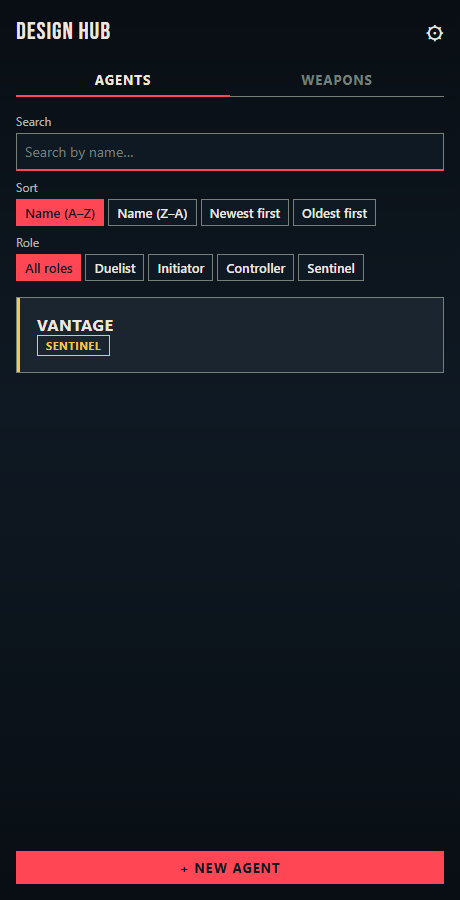
Agent list with search, sort, and role filters
Browse
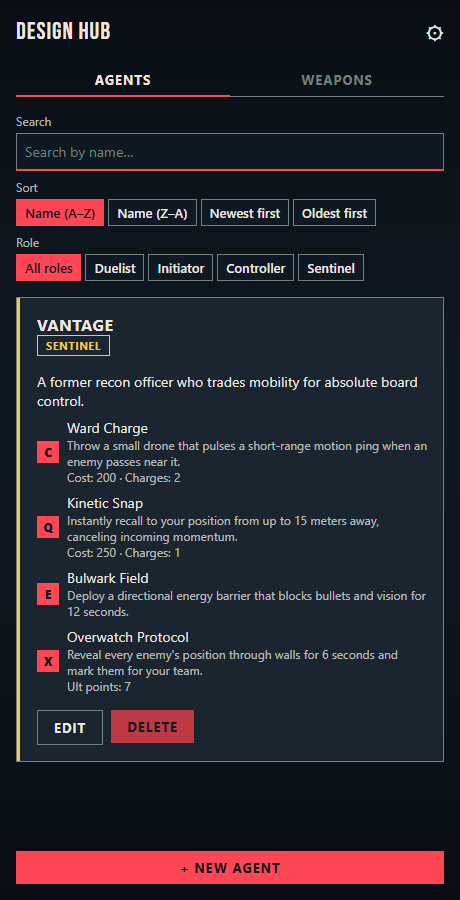
An expanded agent card showing its four abilities
Abilities
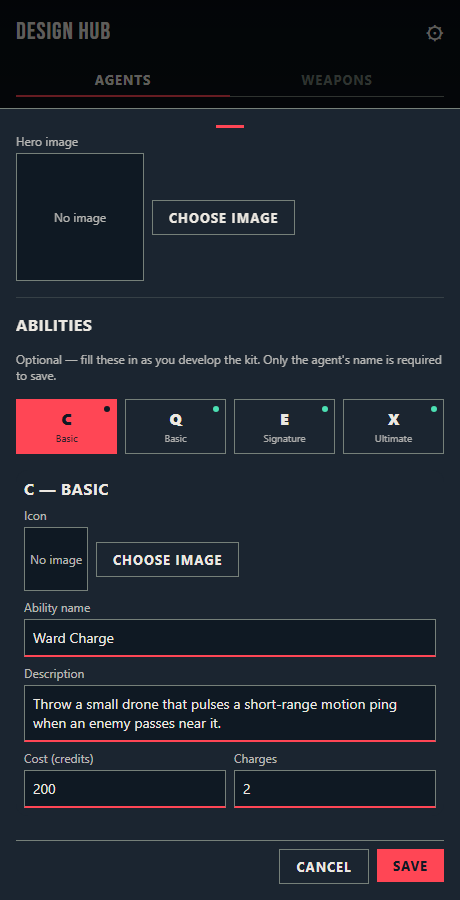
The agent editor with ability podium tabs
Editor

What it does

Agents & weapons

Name, role, bio, a hero image with a drag-to-reposition focal point, and four abilities (C/Q/E/X) each with their own icon, description, and cost/charges. Weapons get category, cost, fire rate, magazine size, and damage falloff.

Search, sort, filter

Both catalogs support live search, multiple sort orders, and role/category filtering.

Fully offline

No backend, no account. Everything lives on-device (SQLite natively, localStorage on web) and can be exported/imported as a single JSON file.

Real installs, not demos

A genuine Windows installer via Electron, and an installable Android APK via EAS Build — not just "runs in Expo Go."

How it's built

UI React Native + react-native-web via Expo — one component tree renders natively on Android and compiles to a static web bundle, the actual mechanism behind "one codebase, three platforms."
Language TypeScript throughout, with shared entity types acting as the single contract between the UI, the store, and both persistence backends.
State Zustand — a single small store holds agents, weapons, and settings in memory and mirrors writes to disk.
Persistence expo-sqlite (native) / localStorage (web) behind one repository interface, so the store never knows which backend it's talking to.
Desktop Electron, wrapping the same web export in a native window to produce a real .exe/NSIS installer, published as a GitHub Release.
Mobile builds EAS Build — installable .apk distributed directly as a GitHub Release, no Play Store review.
Testing Jest — unit coverage on the store, repository, persistence, and data-normalization logic, the layers most likely to silently corrupt user data.

Try it

Installers for Windows and Android. The web version runs from source — see the README for setup.

Download for WindowsWindows 10/11 · installer (.exe) Download for AndroidAndroid phone/tablet · APK Read the full write-up

Neither download is code-signed, so both systems will warn you: Windows SmartScreen says "Windows protected your PC" (choose More info → Run anyway), and Android asks to allow installs from outside the Play Store. That's expected for a personal project, not a sign of anything wrong.